

Control slides with one hand
Move between slides, start or end a presentation, and blank the screen. Move the controls to your right or left thumb.
DAOLSOFT LABS · ANDROID + WINDOWS

Slides, pointers, mouse control and notes, together on your phone. Place the controls where your thumb can reach them.
Android app · Coming soonConnect the standard remote over Bluetooth. Run the optional PC companion when you want live PowerPoint notes.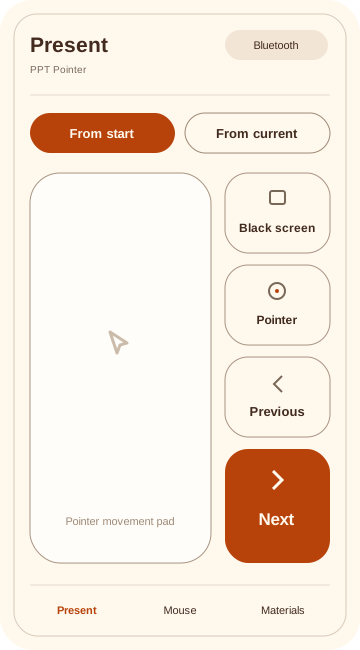
Move between slides, start or end a presentation, and blank the screen. Move the controls to your right or left thumb.
Use a pointer movement pad, a touchpad, or an air mouse that follows the movement of your phone.
Read saved scripts and record on your phone. Choose manual or automatic recording and whether recording continues in the background.
POWERPOINT NOTES
The Windows companion reads the current slide and speaker notes from the PowerPoint presentation you select. Notes stay on the same slide throughout click animations.
How to connectPC DOWNLOAD
Download it on the PC you use for live notes. Select the devices and presentation after opening the file. Close the window to end the connection.
Requires Android 9 or later and a phone with Bluetooth HID support. Device compatibility varies. Live notes do not support PowerPoint for the web or Google Slides.
This development build is not digitally signed. The Android app is not yet available in stores. The PC file works together with the Android app.
Download for Windowsaec33bad0ed24f7ac5d9fd90df051de059f3b246302bc388e7540cf4590bacb7Download checksumsQUICK START
Add the phone in Windows Bluetooth settings and check the pairing code on both devices yourself. Complete the PC connection in the app.
The standard remote and saved scripts work without the PC file. For live notes, choose ‘PC live’ on the phone’s presentation screen.
Select your phone and an open PowerPoint file, then connect. Start the slide show to see its current speaker notes on your phone.